Veil Framework got deprecated more than 6 years ago (just in the config folder on GitHub, we can see the last change was made 4 years ago, a small update, but not on the repo)
While helping students with nudges on the OFFSEC Discord channel as a Student Mentor on their journey to get OSCP+ certified, I noticed many students struggling to install the Veil Framework.
I tested and made it work on two versions of Kali
- Kali AMD (the one that we can get as a Kali VMware image, running on AMD/INTEL processors, mostly Windows being the primary OS)
- Kali ARM (the one we need to install in VMWare, running only on Apple Silicon processors – M1, M2, M3, M4, M5 at the time of writing this)
For the Kali AMD version, you just have to use the following (it will take around 4-5 minutes maximum to install it properly)
sudo apt update
sudo apt install -yqq veil xvfb
xvfb-run /usr/share/veil/config/setup.sh --force --silent
✅ After copying, paste the command into your Kali Linux terminal (Right-click → Paste or Ctrl + Shift + V)
For the Kali ARM version, you will have to emulate Kali AMD on your MacBook.
Personally, I tested the following on a MacBook with an M4 Max processor.
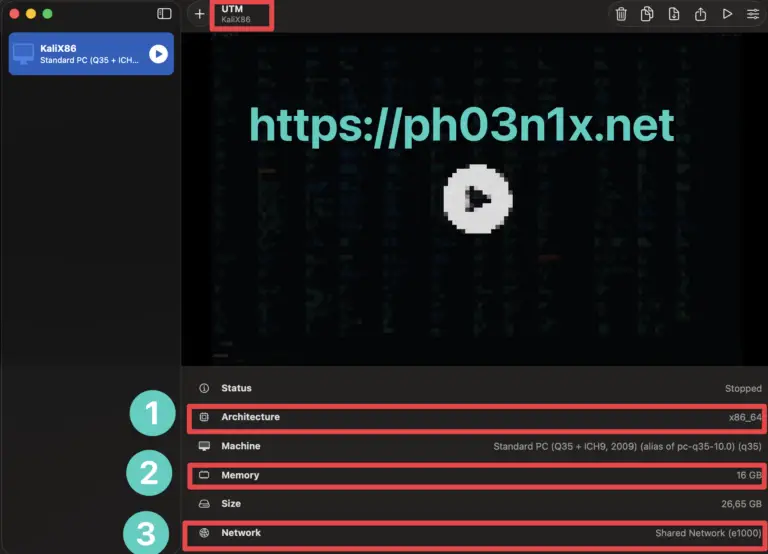
I am using UTM 2 (paid version, around 10 euros lifetime), and it works great (with a slight lag, which I am ok with).
You can also use the free version of UTM, called simple UTM, on the App Store, which works just like the paid one (at the time of writing, it has limitations on a couple of days of usage, enough to solve the exercises).
Notice in the attached screenshot that I assigned 16 GB to run it, and that’s on the x86 architecture.
Once UTM / UTM 2 is installed, just copy and paste the commands I shared for Veil Framework Installation Fix upper.
It will take way more than 5 minutes, depending on your resources.
I hope this helps you out in your journey!